Close Menu
  • Home
  • Featured
  • Technologies
    • Frontend
      • JavaScript
      • AngularJS
      • ReactJS
      • HTML5 & CSS3
    • Backend
      • Java
      • PHP
      • C#
      • Node.js
      • Python
    • DevOps
      • Docker
      • Kubernetes
      • Gitlab
    • Databases
      • SQL
      • MySQL
      • MongoDB
      • SQLite
    • Cloud
      • AWS
      • Azure
      • GCP
    • Frameworks
      • .NET Core
      • .NET
      • Laravel
      • Bootstrap
    • S/W Testing
      • Selenium
      • PostMan
      • JMeter
  • Resources
  • Shop

Subscribe to Updates

Get the latest creative news from FooBar about art, design and business.

What's Hot

Functional vs Non-Functional Requirements in Software Development

April 14, 2026

Deep Dive into Docker Architecture

October 1, 2025

What is MVC in Laravel?

July 5, 2025
Facebook X (Twitter) Instagram LinkedIn WhatsApp YouTube
  • Featured

    Functional vs Non-Functional Requirements in Software Development

    April 14, 2026

    Deep Dive into Docker Architecture

    October 1, 2025

    What is MVC in Laravel?

    July 5, 2025

     Data Protection: Building Trust, Ensuring Compliance, and Driving Growth

    June 4, 2025

    A Beginner’s Guide to Virtualization and Containers.

    May 18, 2025
  • Tech
  • Gadgets
  • Get In Touch
Facebook X (Twitter) Instagram YouTube WhatsApp
Learn with MashLearn with Mash
  • Home
  • Featured

    Functional vs Non-Functional Requirements in Software Development

    April 14, 2026

    Deep Dive into Docker Architecture

    October 1, 2025

    What is MVC in Laravel?

    July 5, 2025

    Understanding Attributes in DBMS

    April 11, 2025

    VPN in Google Cloud Platform (GCP)

    April 4, 2025
  • Technologies
    • Frontend
      • JavaScript
      • AngularJS
      • ReactJS
      • HTML5 & CSS3
    • Backend
      • Java
      • PHP
      • C#
      • Node.js
      • Python
    • DevOps
      • Docker
      • Kubernetes
      • Gitlab
    • Databases
      • SQL
      • MySQL
      • MongoDB
      • SQLite
    • Cloud
      • AWS
      • Azure
      • GCP
    • Frameworks
      • .NET Core
      • .NET
      • Laravel
      • Bootstrap
    • S/W Testing
      • Selenium
      • PostMan
      • JMeter
  • Resources
  • Shop
Learn with MashLearn with Mash
Home » How to secure your facebook account from hackers
Security

How to secure your facebook account from hackers

Edwin MachariaBy Edwin MachariaSeptember 26, 2024Updated:September 26, 2024No Comments3 Mins Read
Facebook Twitter Pinterest LinkedIn Tumblr Email
Share
Facebook Twitter LinkedIn WhatsApp Copy Link

With rise of new dawn of social media, we many have experienced instances where their privacy is compromised. Facebook being one of the key target due to its high number of users. As of 2024, Facebook is the largest social media platform globally with 3.07 billion monthly active users worldwide.

Here are a few things that you can do to keep your account secure.

Protect your password

  • Avoid reusing the same password across multiple websites or apps. Don’t use your Facebook password anywhere else online, and never share it with other people.
  • Your password should be hard to guess, so don’t include your name or common words. Use unique, strong passwords or passphrases for all of your accounts.
  • Learn more about creating a strong password.

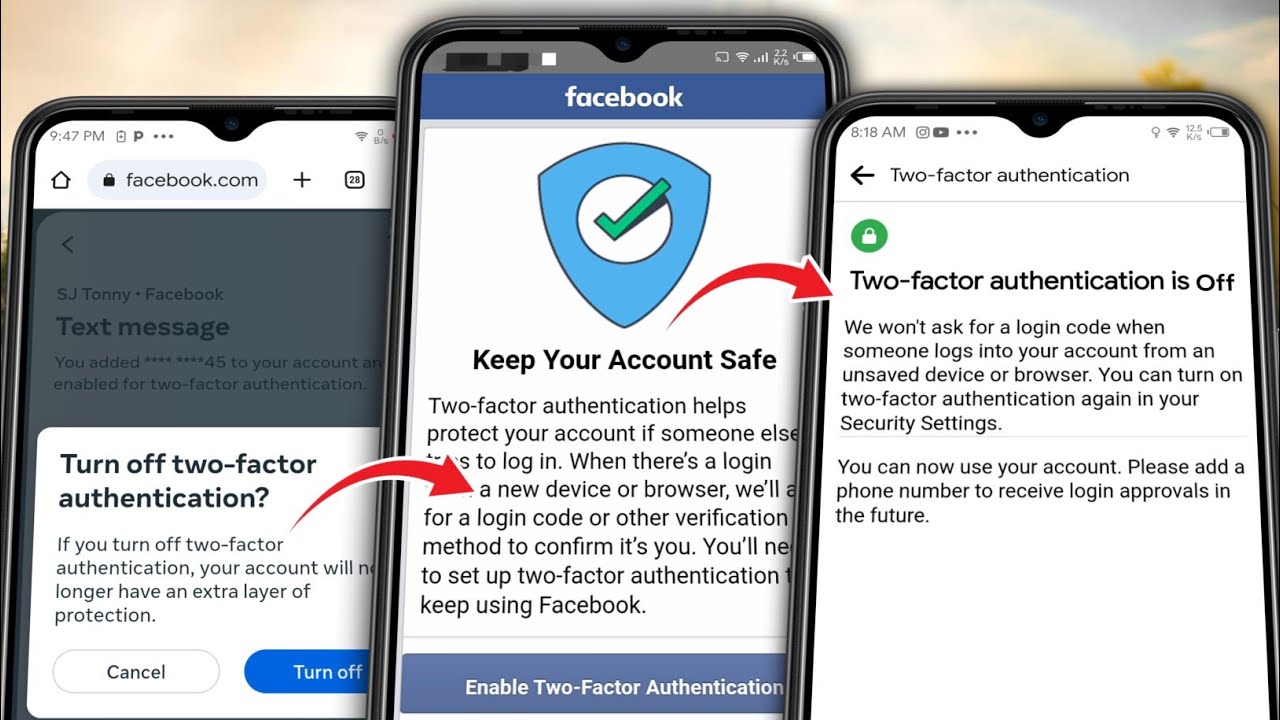
Set up two-factor authentication and other security options

  • With two-factor authentication, you’ll be asked to enter a special login code each time someone tries to access your account from a browser or mobile device we don’t recognise.
  • If you’re logged in to Facebook on a computer, you can use Security Checkup to review your security settings or to set up two-factor authentication.
  • You can also get alerts about unrecognised logins.

Never share your login information

  • Scammers may create fake websites that look like Facebook and ask you to log in with your email address and password.
  • Always check the website’s URL before you enter your login information. When in doubt, type www.facebook.com into your browser to get to Facebook.
  • Don’t forward emails from Meta to other people, as they may have sensitive information about your account.
  • Learn more about how to protect yourself from phishing.

Don’t accept friend requests from people you don’t know

  • Scammers may create fake accounts to friend people on Facebook.
  • Becoming friends with scammers on Facebook might allow them to spam your timeline, tag you in posts and send you malicious messages.

Never click suspicious links, even if they appear to come from a friend or a company you know

  • This includes links on Facebook (e.g. on posts), in emails or texts.
  • Bear in mind that Meta will never ask you for your password in an email.
  • If you suspect that a link on Facebook is suspicious, report it.

Watch out for malicious software

  • Malicious software can cause damage to a computer, server or computer network.
  • Learn the signs of an infected computer or device and how to remove malicious software.
  • Keep your web browser up to date and remove suspicious applications or browser add-ons.

Log out of Facebook when you use a computer that you share with other people

  • If you forgot to log out on a device, you can log out remotely.
Share. Facebook Twitter LinkedIn WhatsApp
Edwin Macharia
  • Website

Software Engineer || Database Administrator || DevOps Developer || Certified Scrum Master

Related Posts

 Data Protection: Building Trust, Ensuring Compliance, and Driving Growth

June 4, 2025

How to Set Up a VPN in 5 Minutes

January 24, 2025

The Pros and Cons of Bio-metric Authentication

November 28, 2024

Virtual Private Network (VPN)

October 20, 2024
Add A Comment
Leave A Reply Cancel Reply

Editors Picks

Functional vs Non-Functional Requirements in Software Development

April 14, 2026

Deep Dive into Docker Architecture

October 1, 2025

What is MVC in Laravel?

July 5, 2025

 Data Protection: Building Trust, Ensuring Compliance, and Driving Growth

June 4, 2025
Top Reviews
Advertisement
Learn with Mash
Facebook X (Twitter) Instagram YouTube LinkedIn WhatsApp
  • Home
  • Tech
  • Gadgets
  • Mobiles
  • Privacy & Policy
© 2026 Edwin Macharia. Designed by Movosoft Technologies.

Type above and press Enter to search. Press Esc to cancel.

Ad Blocker Enabled!
Ad Blocker Enabled!
Our website is made possible by displaying online advertisements to our visitors. Please support us by disabling your Ad Blocker.